Budgeting software that compares the plan with the ledger.
Prepare a budget by cost centre, distribute it across the months of the year and submit it for review and approval. Actuals come from the same ledger the business posts to, so budget versus actual reporting and variance analysis need no spreadsheet in between.
From ZMW 300 a month14-day free trialApprovals and self-service included
What Budgeting & Planning is for
Plan the year and stop overspending before it happens. Budgets by department, cost centre and branch, measured against what is really being spent.
Why it matters
What changes when you move to Budgeting.
The budget is a spreadsheet filed away in January.
The budget lives in the same system as the spending.
Overspending shows up after the money has left.
Control rules warn or block when a line is over.
Departments can't see what they have left.
Available funds are visible to those responsible.
Revisions are emailed around until nobody knows the current version.
Versions and transfers between lines are all on record.
Comparing budget with actual is a manual job every month.
Variance is ready whenever you ask.
Features
Everything Budgeting & Planning gives you.
Described in plain language, by what each part does for your business.
Budgets where they belong
Budgets by department, cost centre and branch.
Monthly distribution
Spread the year across its months the way your business really runs.
Control rules
Warn someone or block the spending when a line goes over budget, your choice.
Transfers and versions
Move money between lines and revise the budget, with each version kept.
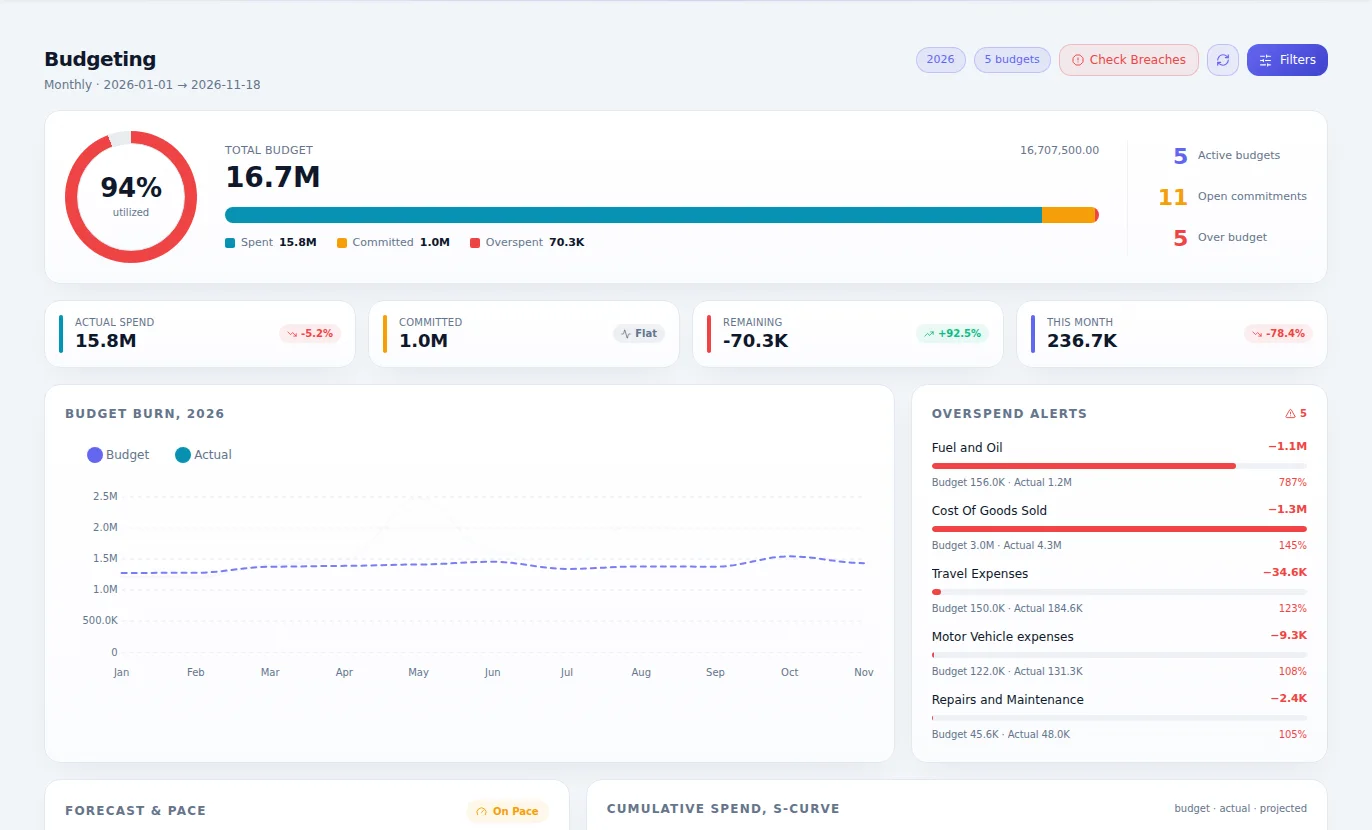
Budget against actual
Variance and available funds, drawn from what has really been posted.
Review and approval
Budgets go through review and approval before they count.
Control that stops overspend
Control rules check requisitions, orders and the pay run against what is left, and warn or stop before money is committed.
Commitments counted
A commitment register of what is ordered but not yet spent, so available funds are the real figure.
Every view of the budget
Departmental, cost centre, branch and consolidated budgets, forecasts and period trends.
Kora builds the draft
With Kora, describe how next year should look and she builds the budget lines from your rules, for you to review.
How it works
From first step to finished work.
Prepare
Build the budget by department or cost centre, optionally from last year's figures.
Approve
Submit it for review, and approve the version that counts.
Control
Spending is checked against what is available.
Compare
See the variance through the year and revise where it makes sense.
Who it's for
Everyone who touches the work.
Finance managers
Run one budget process and keep control.
Department heads
See what they have left before they commit.
Owners and boards
See whether the year is going to plan.
NGO and project teams
Keep to donor budgets, line by line.
Where it fits best
Results
How it makes your business run better.
No overspending surprises
Problems show up before the money leaves.
Clear ownership
Each line has someone answering for it.
Less spreadsheet work
Budget against actual is simply there.
Sharper planning
Next year starts from this year's real numbers.
Connected
It works with the rest of your business.
Start with Budgeting & Planning on its own and add the others when you need them. Nothing has to be typed twice.
Budgeting & Planning
One set of books underneath.
Editions
Pay for what your business needs today.
Start small, move up whenever you are ready, and only ever pay for the modules you use.
One edition, everything included
ZMW 300 a monthNo choosing between editions. Add it to a bundle or to your own selection of modules.
- Budgets where they belong
- Monthly distribution
- Control rules
- Transfers and versions
- Budget against actual
- Review and approval
- Control that stops overspend
- Commitments counted
- Every view of the budget
- Kora builds the draft
Included in every plan, at no charge
Questions
Questions about Budgeting & Planning.
Yes. Budgets are prepared by cost centre and spread across monthly periods.
Book an hour with us to see CoreStack working on your own figures.
Bring last month's numbers and the thing that frustrates you most. We'll show you how it works in CoreStack.
Swipe to see all of it
Last month's numbers
What frustrates you
Month-end takes forever
Month-end, on one set of books
On your own figures
An hour with our team, with your numbers on the screen. The figures here are examples.