Accounting software for growing businesses.
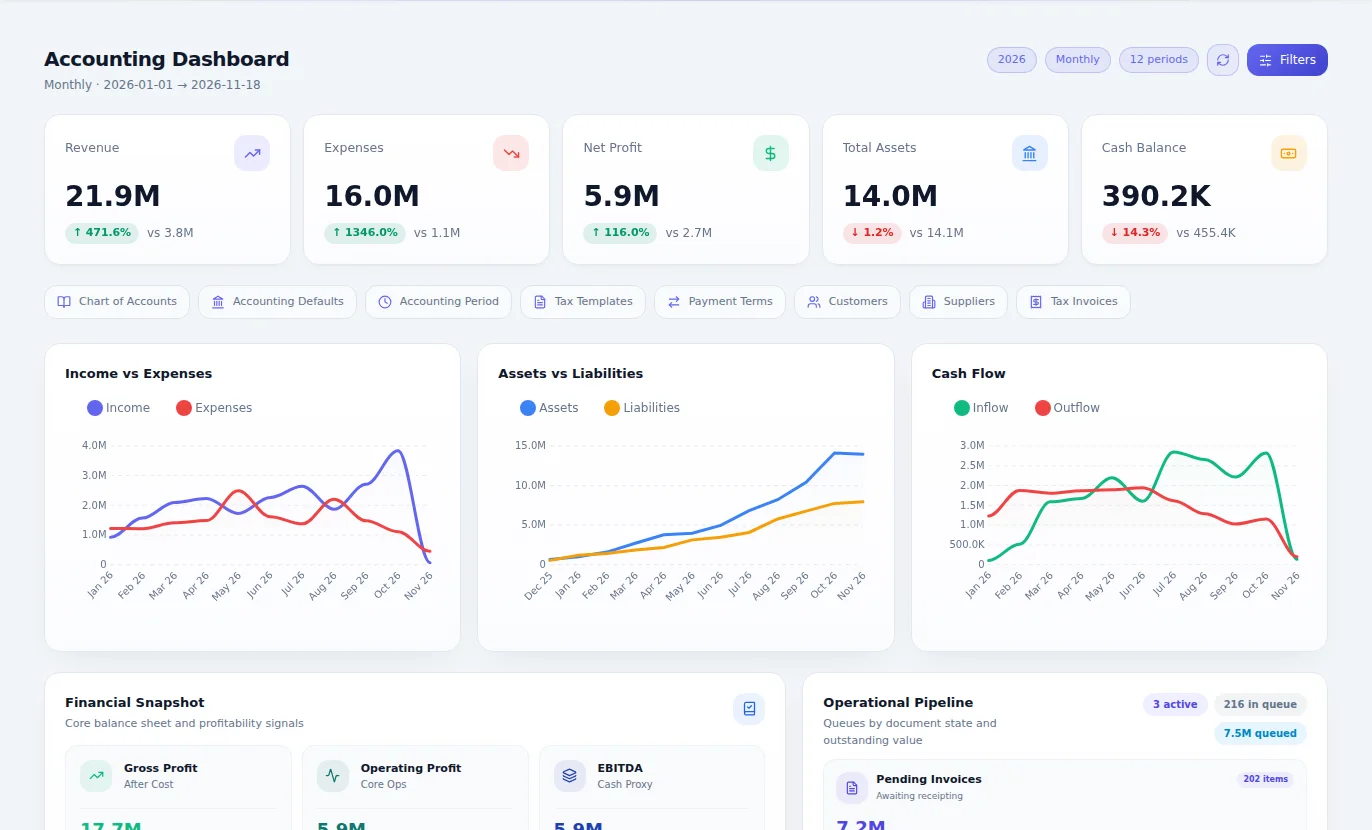
CoreStack Accounting is the financial core of the Business Management System: the general ledger, receivables and payables, banking, credit control, VAT and tax returns, with 78 built-in reports. Payroll, stock, procurement and sales post their entries into the same chart of accounts, so month end starts from one set of books instead of several exports.
From ZMW 500 a month14-day free trialApprovals and self-service included
What Accounting & Finance is for
Books you can trust every day, not only at year end. Every invoice, bill, receipt and payment reaches the ledger the moment it is saved, so the numbers you decide on are today's numbers.
Why it matters
What changes when you move to Accounting.
Month end means chasing paper, exports and last-minute corrections.
Month end becomes a review of work already posted, not a rebuild of it.
Nobody can say what is really owed to you, or what you owe, without asking finance to work it out.
Customer and supplier balances, with their ageing, are one click away for whoever is allowed to see them.
Sales, stock and payroll each keep their own figures, and they rarely agree.
Every module posts into one chart of accounts, so there is one set of numbers.
VAT and withholding tax are pieced together from several places when the deadline is close.
VAT and withholding schedules build themselves as you trade.
Your profit only becomes clear weeks after the month it belongs to.
Profit and loss, balance sheet and cash flow are ready whenever you ask for them.
Features
Everything Accounting & Finance gives you.
Described in plain language, by what each part does for your business.
General ledger
Your chart of accounts, journals, accounting periods and period closing, in any currency you trade in, with exchange rates kept alongside.
Selling and receivables
Quotations, proforma and tax invoices, cash sales, credit notes, delivery notes and receipts, all in one flow from offer to money in the bank.
Buying and payables
Supplier records, purchase invoices, debit notes and supplier payments, so you always know what is due and when.
Banking
Bank accounts, bank transactions and the cashbook kept next to the ledger, so what the bank says and what the books say stay close.
Statements people can read
Trial balance, profit or loss and OCI, the statement of financial position and the notes to the financial statements, plus customer and supplier statements you can send out.
Tax
VAT input and output, withholding tax and tax templates, ready when the return is due.
Bring your history with you
Sixteen imports from Excel: chart of accounts, opening balances, customers, suppliers, invoices, cash sales, credit notes, purchase invoices, journals, receipts, payments and bank lines. Thousands of rows at a time, checked before anything posts.
Month-end close
A close checklist that shows what is done and what is holding the month up, then a books lock, so nothing is posted into a closed month without someone allowed to reopen it.
Credit control
Customer statements emailed on a schedule, interest on overdue balances, bad debt write-offs and recoveries, a receivables provision, and deposits matched to the invoices they paid for.
Multi-currency
Trade in any currency. The rate you type stays with the document, CoreStack learns the rates you use, and open balances are revalued with the gain or loss posted.
Share register
Share classes, members, share issues, transfers and certificates, with the cap table always up to date.
Withholding tax and levies
Withholding tax rules applied as you pay, the WHT register, and the insurance premium levy, beside VAT input and output.
ProAnd when you need more
Orders before invoicing
Sales orders, job cards, purchase orders, open-order tracking and invoice matching for a business that takes orders first.
Petty cash and imprest
Issue, retire and replenish petty cash, handle expense claims and see overspending by staff member before it grows.
The full statements
Statement of cash flows and statement of changes in equity, for owners, lenders and auditors who ask for the complete set.
Analytics
Seventeen views of margins, revenue, expenses, ratios, branches, departments and cost centres.
Automation
Recurring invoices and journals, and prepayments released month by month, so routine entries stop taking anyone's time.
Tax returns
VAT and turnover tax returns, corporate tax computations, provisional tax schedules, and withholding tax certificates issued and received, prepared from the posted ledger.
Accruals and deferrals
Schedules that release prepayments and accruals month by month, with a register of what is still to be released.
Group reporting
Cost allocation rules and runs, intercompany balances, elimination journals, and the consolidated trial balance, income statement and balance sheet across your companies.
See it work
Accounting, running.
A short simulation of the work moving through the module. The people and figures are examples.
ledger1,284 postings
Profit and loss
RevenueK 14.7M
CostsK 10.7M
Net profit+ K 4.0M
Balance sheet
Balances
Cash flow
Cash todayK 2.9M
Swipe to see all of it
How it works
From first step to finished work.
Set up your books
Start from your own chart of accounts and bring in opening balances from Excel. Our team can do this with you.
Trade as normal
Raise invoices, record bills and bank what comes in. Each document updates the ledger when it is saved.
Let the other modules post
Payroll, stock, procurement and sales post their own entries, so finance stops retyping them.
Review and close
Check the exceptions, run your statements and close the period. It stays closed until someone with the right to reopen it does.
Who it's for
Everyone who touches the work.
Accountants
Spend the month reviewing and advising instead of capturing and correcting.
Business owners
See profit, cash and what customers owe without waiting for a report.
Sales and admin staff
Raise invoices and receipts that land in the books without passing through finance twice.
Auditors
Follow any number back to the document behind it.
Where it fits best
Results
How it makes your business run better.
A faster close
The work is posted as it happens, so closing the month is a check rather than a project.
Better decisions
Owners decide on this week's numbers, not last quarter's.
Money collected sooner
Aged balances and statements make it clear who to call today.
Fewer surprises at audit
Each figure traces back to its document, with who did what on record.
Connected
It works with the rest of your business.
Start with Accounting & Finance on its own and add the others when you need them. Nothing has to be typed twice.
Accounting & Finance
One set of books underneath.
Editions
Pay for what your business needs today.
Start small, move up whenever you are ready, and only ever pay for the modules you use.
Essentials
ZMW 500 a monthFor a business that invoices, pays suppliers, banks, chases what it is owed, files tax and closes every month cleanly.
- General ledger
- Selling and receivables
- Buying and payables
- Banking
- Statements people can read
- Tax
- Bring your history with you
- Month-end close
- Credit control
- Multi-currency
- Share register
- Withholding tax and levies
Pro
ZMW 900 a monthFor a business that takes orders first, runs imprest, prepares its tax returns from the books, reports across a group and wants every statement and analysis.
- Everything in Essentials
- Orders before invoicing
- Petty cash and imprest
- The full statements
- Analytics
- Automation
- Tax returns
- Accruals and deferrals
- Group reporting
Included in every plan, at no charge
Questions
Questions about Accounting & Finance.
Yes. Input and output VAT are tracked on transactions and the VAT schedules are produced from the ledger. Sales invoices can also be transmitted to ZRA through the Smart Invoice module.
Add or take out VAT, and check which tax your turnover falls under.
Open the VAT calculatorBook an hour with us to see CoreStack working on your own figures.
Bring last month's numbers and the thing that frustrates you most. We'll show you how it works in CoreStack.
Swipe to see all of it
Last month's numbers
What frustrates you
Month-end takes forever
Month-end, on one set of books
On your own figures
An hour with our team, with your numbers on the screen. The figures here are examples.