Inventory management software that ties stock to the books.
Know what stock you have, where it is and how it moved. CoreStack tracks stock across warehouses by batch or serial number, receives it against goods received notes, and revalues it against the same ledger finance closes, so stock on hand and stock in the accounts agree.
From ZMW 600 a month14-day free trialApprovals and self-service included
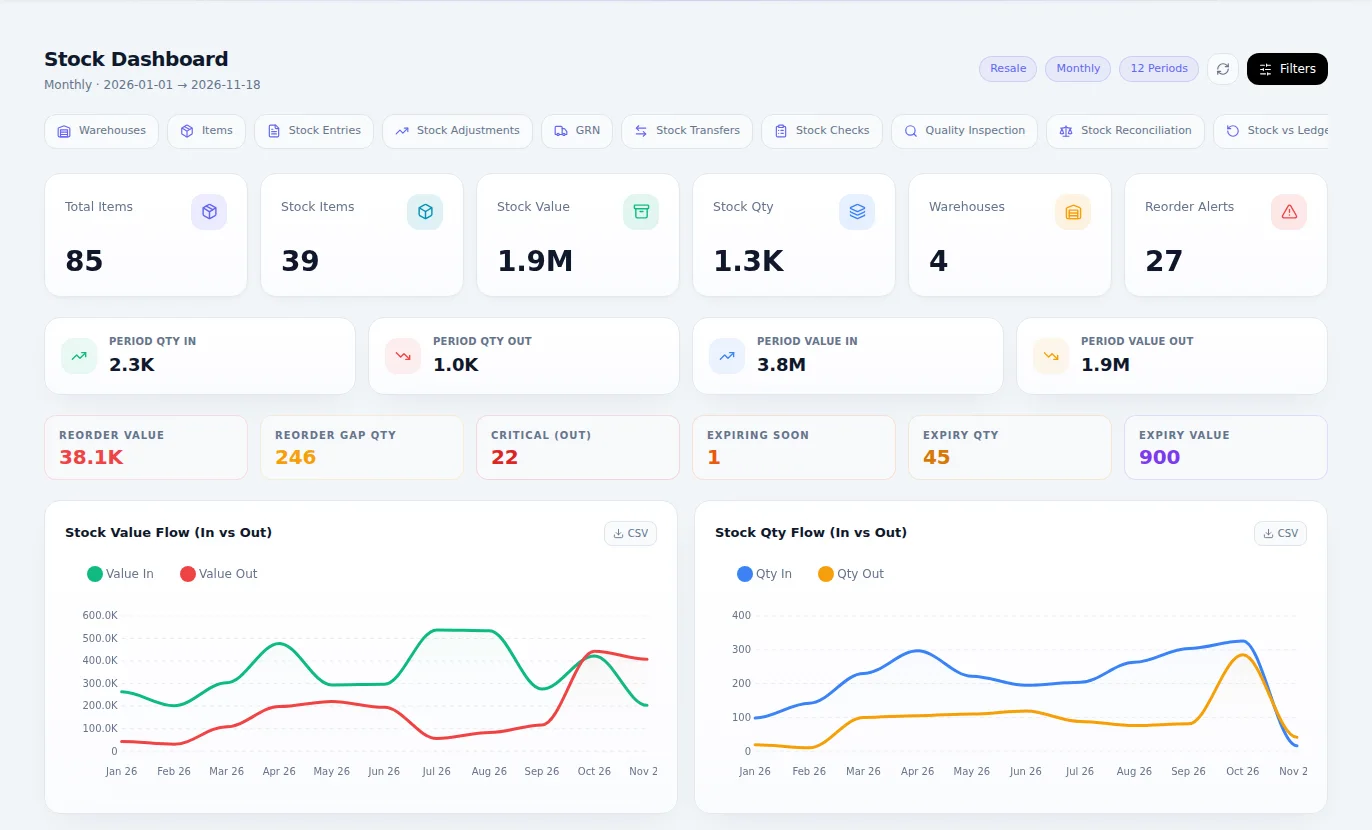
What Inventory & Warehousing is for
Know what you have, where it is and what it is worth, in every warehouse and bin. Run out less, lose less, and keep stock value in step with the accounts on every movement.
Why it matters
What changes when you move to Stock.
The system says you have stock, and the shelf says otherwise.
Each movement is a document, so stock on record follows what really happened.
You find out an item has run out when a customer asks for it.
Reorder suggestions show what is running low, branch by branch.
Stock sits expiring at the back while you reorder the same thing.
Slow, dead and expiring stock is listed so you can act on it.
Losses are only discovered at the annual count, too late to act.
Guided counts and shrinkage reports catch losses early.
Finance's stock value and the warehouse's never match.
Stock is checked against the ledger, so the two agree.
Features
Everything Inventory & Warehousing gives you.
Described in plain language, by what each part does for your business.
Items
Items, categories, units of measure, packaging and brands, set up once and used everywhere.
Warehouses and bins
Every warehouse and bin, with who has custody of each and what it holds.
Movements
Goods received, deliveries, stock issues and transfers between warehouses, each one on record.
Empties and incidents
Returnable empties and deposits, plus stock losses and incidents, tracked rather than forgotten.
Make and pack
Recipes and production, recording the ingredients each batch consumes.
Agreeing with the books
Stock adjustments and reconciliation, with stock checked against the ledger.
Reports you act on
Stock ledger, balance and valuation, reorder suggestions, shrinkage and loss.
Demand and replenishment
Reorder suggestions from what you sell and what is on order, with purchase, price, inventory and warehouse analytics.
Units that add up
Buy in cartons, sell in pieces: each line keeps the unit it was typed in while stock counts in its base unit.
Warehouse accountability
Each warehouse's custodian for a period, its papers and contacts, and losses, shrinkage and handovers recorded against the person responsible.
ProAnd when you need more
Stock counts
Count sheets by warehouse and bin, with differences posted once they are approved.
Quality inspection
Inspect goods on receipt and keep the inspection records.
Revaluation
Revalue stock to a new cost, with the difference posted to the books.
Repackaging
Break bulk into smaller units, or pack small units into larger ones.
Stock analysis
Ageing, turnover, fast, slow and dead stock, expiring stock and period valuation.
See it work
Stock, running.
A short simulation of the work moving through the module. The people and figures are examples.
A-03-1
A-04-284
A-05-1
A-06-1
B-01-1
B-03-1
B-04-2
B-05-1
C-01-1
C-02-2
C-03-1
C-04-1
Cooking oil 5 L, reorder at 50 crates
Cooking oil 5 LIn stock
Sugar 2 kgIn stock
Yoghurt 1 LExpires in 12 days
Bath soapReorder
Swipe to see all of it
How it works
From first step to finished work.
Receive
Goods come in against the order, get checked and go on the record.
Put away
Each item goes to its warehouse and bin, so anyone can find it.
Move and sell
Transfers, issues and sales keep every location's balance right.
Count and act
Count by bin, see what is low, slow or expiring, and order only what you need.
Who it's for
Everyone who touches the work.
Storekeepers
Know what is in each bin and where each item went.
Branch managers
See what is running low before customers do.
Buyers
Order from real demand and real balances.
Finance teams
Trust the stock value on the balance sheet.
Where it fits best
Results
How it makes your business run better.
Fewer stock-outs
Low lines show up early enough to do something about them.
Less money tied up
Slow and dead stock is visible, so cash stops sitting on shelves.
Fewer losses
Counts and shrinkage reports catch problems while they are small.
Numbers that agree
The warehouse and finance finally work from one figure.
Connected
It works with the rest of your business.
Start with Inventory & Warehousing on its own and add the others when you need them. Nothing has to be typed twice.
Inventory & Warehousing
One set of books underneath.
Editions
Pay for what your business needs today.
Start small, move up whenever you are ready, and only ever pay for the modules you use.
Essentials
ZMW 600 a monthFor receiving, storing and moving stock accurately, with the value always right.
- Items
- Warehouses and bins
- Movements
- Empties and incidents
- Make and pack
- Agreeing with the books
- Reports you act on
- Demand and replenishment
- Units that add up
- Warehouse accountability
Pro
ZMW 900 a monthFor a store that counts, inspects and repacks, and needs to know what is slow, dead or about to expire.
- Everything in Essentials
- Stock counts
- Quality inspection
- Revaluation
- Repackaging
- Stock analysis
Included in every plan, at no charge
Questions
Questions about Inventory & Warehousing.
Yes. Stock entries and transfers work across multiple warehouses, and every movement is recorded.
Book an hour with us to see CoreStack working on your own figures.
Bring last month's numbers and the thing that frustrates you most. We'll show you how it works in CoreStack.
Swipe to see all of it
Last month's numbers
What frustrates you
Month-end takes forever
Month-end, on one set of books
On your own figures
An hour with our team, with your numbers on the screen. The figures here are examples.