Project management with the costs attached.
Create a project with its type and plan, break the work into tasks and assign a team. Activities are costed against the budget, expenses are logged as they happen, risks go in the register and progress is reported at review checkpoints, with manager and portfolio dashboards over all of it.
From ZMW 400 a month14-day free trialApprovals and self-service included
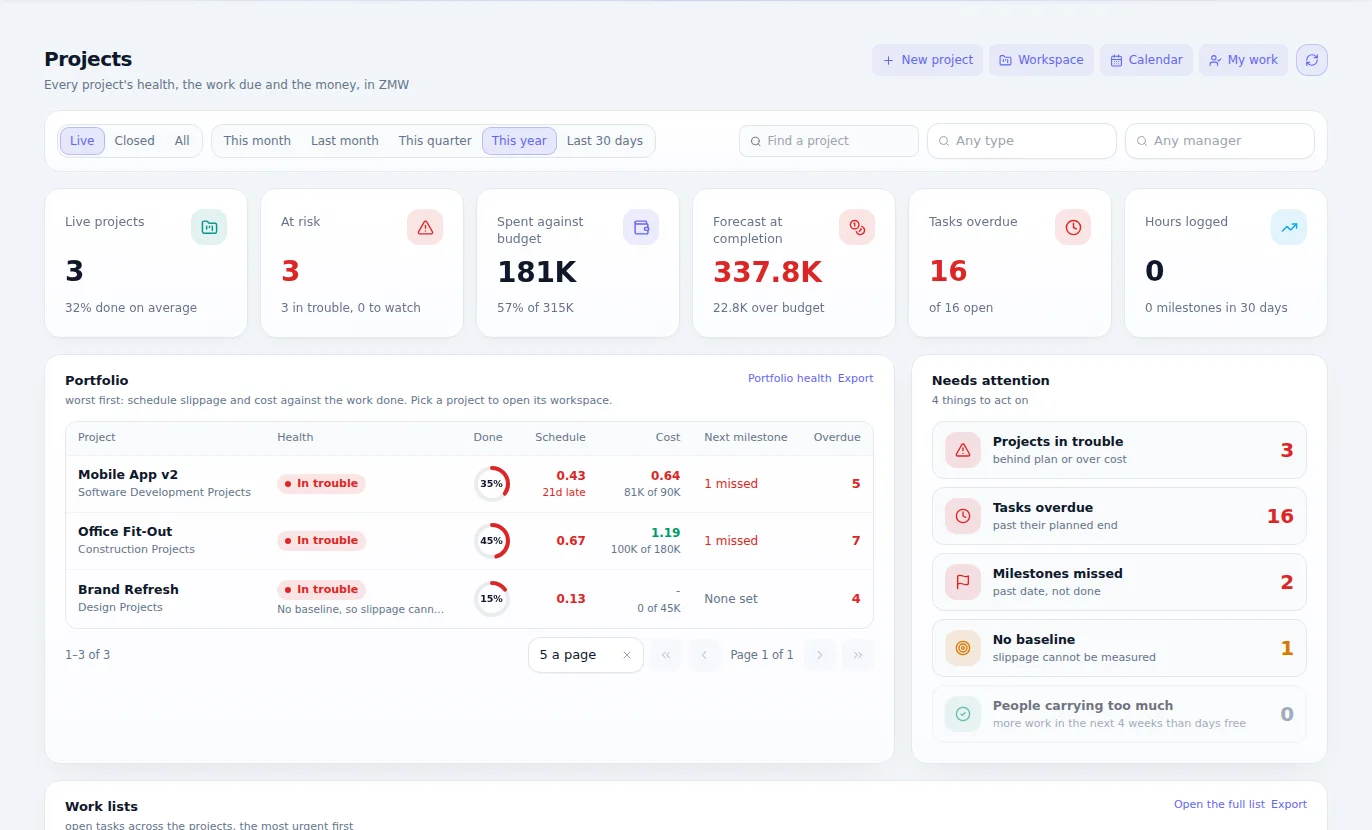
What Project Management is for
Plans, people and costs for every project, in one place. See what is on track, who is overloaded and whether the job is still making money while there is time to act.
Why it matters
What changes when you move to Projects.
The plan is in one file, the costs in another, and the team on WhatsApp.
Plan, tasks, people and money sit on one project.
You learn a project is over budget when it is finished.
Project financials show the position as costs come in.
Nobody can see who is overloaded and who has room.
Resource load shows who is stretched.
Timesheets arrive late and don't connect to anything.
Timesheets count against the project.
Materials are requested informally and not charged to the job.
Material requests are tied to the work.
Features
Everything Project Management gives you.
Described in plain language, by what each part does for your business.
Plans and tasks
Project plans and tasks, with Gantt schedule, board and work breakdown views.
Teams and timesheets
Project teams and their timesheets, on the same employee records as HR.
Material requests
Ask for what the job needs, against the project.
Resource load
See how much each person is carrying, before someone drops something.
Baselines and variance
Compare where you are with what was promised.
Project financials
Activity costs and project expenses, with the money visible all the way through.
Critical path
See which tasks really decide the finish date.
Risk register
Record what could go wrong, and who is watching it.
Reviews and dashboards
Review schedules and project updates, with manager and portfolio dashboards.
Gantt, board and WBS
The schedule as a Gantt chart, a board and a work breakdown, with baselines to measure slippage against.
Approvals on every stage
Project registers and stage gates approved through your own workflow, with who approved what on record.
Billing plans and WIP
Rate cards, cost codes, budgets and billing plans, with work in progress and profitability per project.
Templates to start from
Project templates, a starter library and an import for your existing programme.
How it works
From first step to finished work.
Plan
Set up the project, its tasks, its team and its budget.
Run
People work their tasks and log their time. Materials and costs come in against the job.
Watch
Baselines, risk and financials show where it is drifting.
Close
Finish the job, with the real cost and margin on record for the next quote.
Who it's for
Everyone who touches the work.
Project managers
Run plan, people and cost from one place.
Team members
Know their tasks and record their time.
Directors
See the whole portfolio at a glance.
Finance teams
See project costs as they build, not at the end.
Where it fits best
Results
How it makes your business run better.
Fewer overruns
You see drift early, while you can still correct it.
Better use of people
Work is shared out using facts.
Better quotes
Real costs from past jobs inform the next price.
Fewer status meetings
Everyone reads the same project.
Connected
It works with the rest of your business.
Start with Project Management on its own and add the others when you need them. Nothing has to be typed twice.
Editions
Pay for what your business needs today.
Start small, move up whenever you are ready, and only ever pay for the modules you use.
One edition, everything included
ZMW 400 a monthNo choosing between editions. Add it to a bundle or to your own selection of modules.
- Plans and tasks
- Teams and timesheets
- Material requests
- Resource load
- Baselines and variance
- Project financials
- Critical path
- Risk register
- Reviews and dashboards
- Gantt, board and WBS
- Approvals on every stage
- Billing plans and WIP
- Templates to start from
Included in every plan, at no charge
Questions
Questions about Project Management.
Yes. Activities are costed against the budget and expenses are logged against the project.
Book an hour with us to see CoreStack working on your own figures.
Bring last month's numbers and the thing that frustrates you most. We'll show you how it works in CoreStack.
Swipe to see all of it
Last month's numbers
What frustrates you
Month-end takes forever
Month-end, on one set of books
On your own figures
An hour with our team, with your numbers on the screen. The figures here are examples.